Reference settings for checking backtests
MT5 Backtest Settings to Match Carefully
This page documents the reference settings Smart Entry Lab uses when explaining EA backtests. If your setup differs, results can differ too, especially broker, symbol, delay, model, leverage, and deposit.
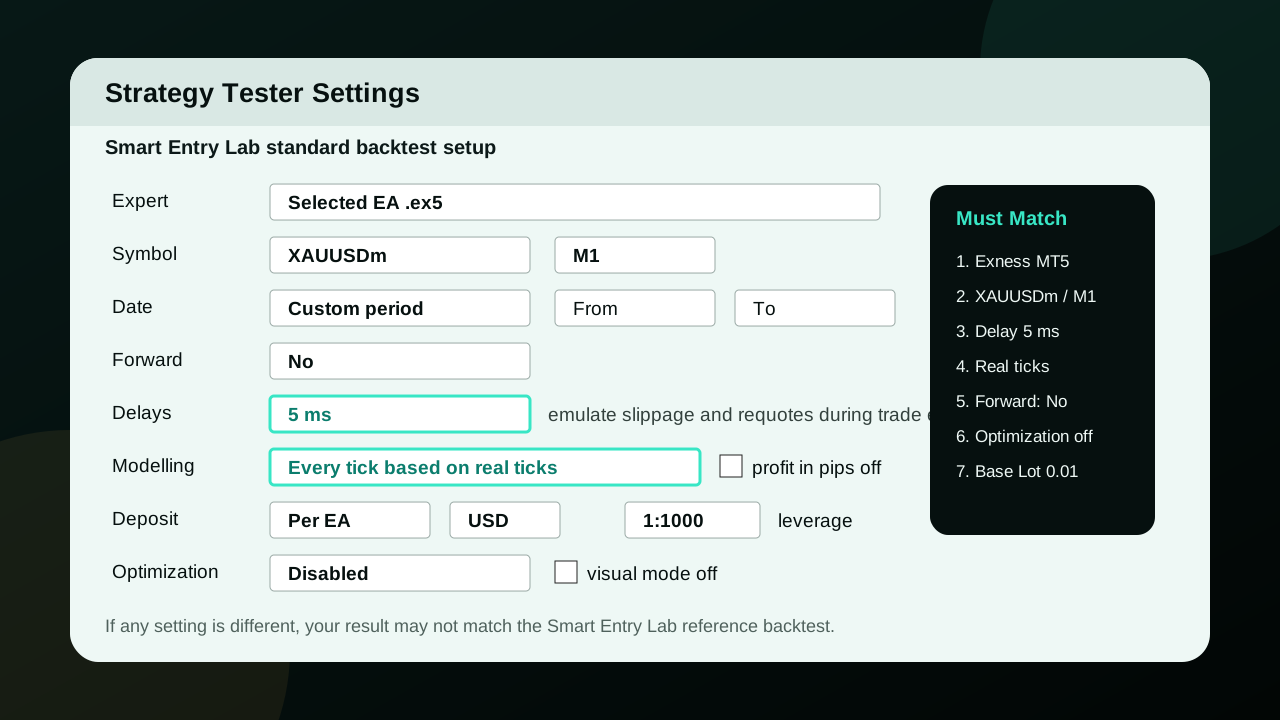
Settings to Check
| Broker / Terminal | Exness MT5 |
| Symbol | XAUUSDm for reference tests |
| Timeframe | Follow each EA report |
| Forward | No |
| Delays | 5 ms |
| Modelling | Every tick based on real ticks |
| Deposit | Follow the capital stated in each EA report |
| Currency | USD / USDC depending on account type |
| Leverage | 1:1000 |
| Optimization | Disabled |
| Base Lot | 0.01 in EA inputs unless the page says otherwise |
Important Notes
- A backtest is historical reference data, not a guarantee of future results.
- Delay 5 ms helps emulate slippage and requotes during execution.
- If broker, symbol, spread, leverage, or deposit differs, retest independently.
- EAs on this site mainly reference Exness 3-digit symbols. Be extra careful on other brokers.
Checklist Before Comparing Results
- Match the broker and symbol used in the report.
- Set Delays = 5 ms and Modelling = Every tick based on real ticks.
- Check deposit and Base Lot 0.01.
- Read Max Equity DD before focusing on Net Profit.