Read EA Backtests for Risk, Not Just Profit
When I look at an EA, I do not start with profit alone. I check what that profit was traded for: drawdown, trade count, broker conditions, and the test period.
This page helps beginners read MT5 reports calmly before downloading an EA and testing it on demo or a cent account.
Quick Path
1. What Profit Factor tells you 2. Recovery Factor needs drawdown context 3. Max Equity DD matters more than Balance DD 4. Low trade count needs caution 5. Different settings can change resultsRead This First
- A backtest is historical information, not a future result.
- A smooth curve can still fail badly if live market behavior changes.
- If you do not understand drawdown, lot size, leverage, and broker conditions, I would not rush into live money.
What Profit Factor Tells You
Profit Factor compares gross profit with gross loss. Above 1 means the test period produced more gross profit than gross loss, but it still needs trade count, drawdown, and entry logic context.
Recovery Factor Needs Drawdown Context
Recovery Factor compares net profit against drawdown. If Max Equity DD is large, a good-looking Recovery Factor may still be unsuitable for traders who cannot tolerate deep fluctuations.
Max Equity DD Matters More Than Balance DD
Balance DD looks at closed trades. Equity DD includes floating positions. For grid, basket, zone, or long-holding systems, I always treat Equity DD as the more important risk number.
Low Trade Count Needs Caution
If a report has few trades, it may not cover enough market conditions such as strong ranges, news spikes, or unusual long trends. Forward testing is still needed.
Different Settings Can Change Results
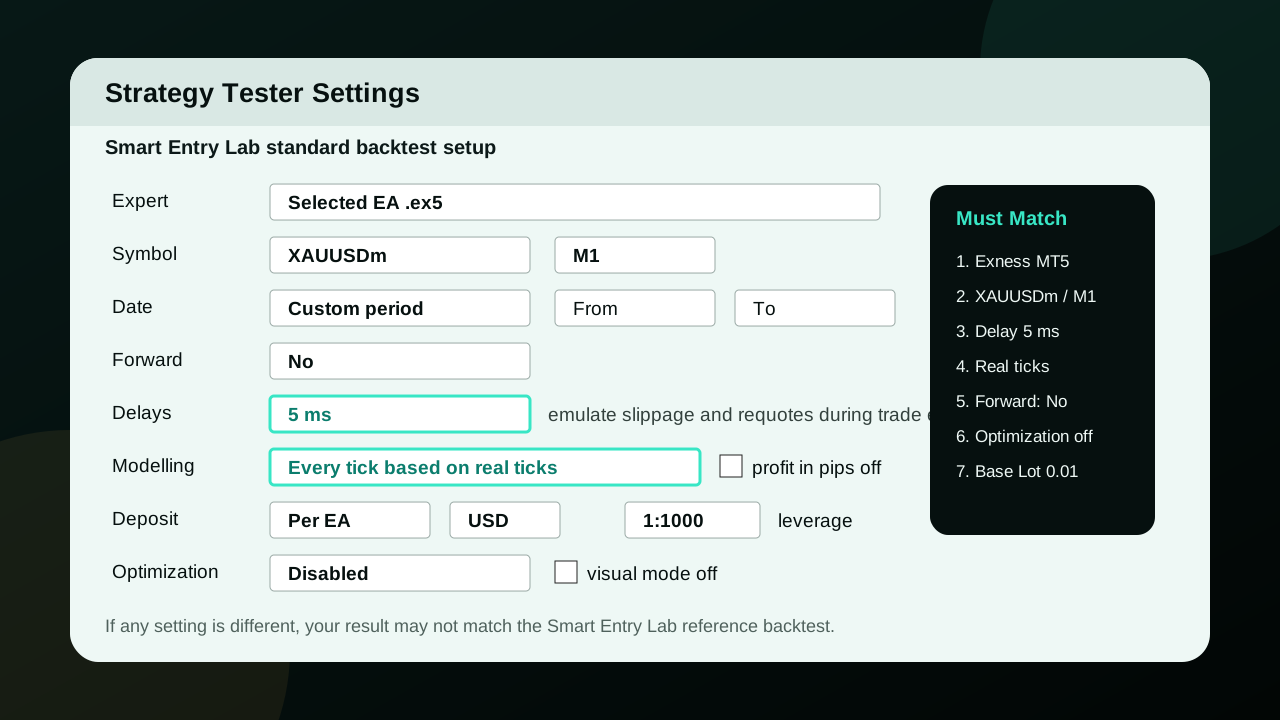
Broker, symbol, timeframe, deposit, leverage, model, delay, and Base Lot all affect the test. If your setup differs from the report, your result may differ too.
Open Backtest SettingsMT5 Strategy Tester Reference
Checklist Before Downloading an EA
- Identify whether the EA is grid, martingale, basket, trend, zone, or non-grid.
- Check reference capital and Base Lot before comparing it with your own account.
- Open the Original MT5 Report to inspect the equity curve and trade details.
- Always run demo or forward testing first.